Starting a C++ Kernel
What you will build
Section titled “What you will build”Lesson 02 ended with a real
milestone: a boot sector that built its own GDT, switched the CPU into 32-bit
protected mode by hand, and jumped into a kernel that wrote
Protected mode is active. straight into VGA memory. Every single step of
that transition was ours - which also means every single step was something
we had to get exactly right, in raw assembly, before anything else could run.
That does not scale. A real kernel is thousands of lines long, touches dozens of subsystems, and benefits enormously from a language with functions, structures, and classes. This lesson makes two changes at once:
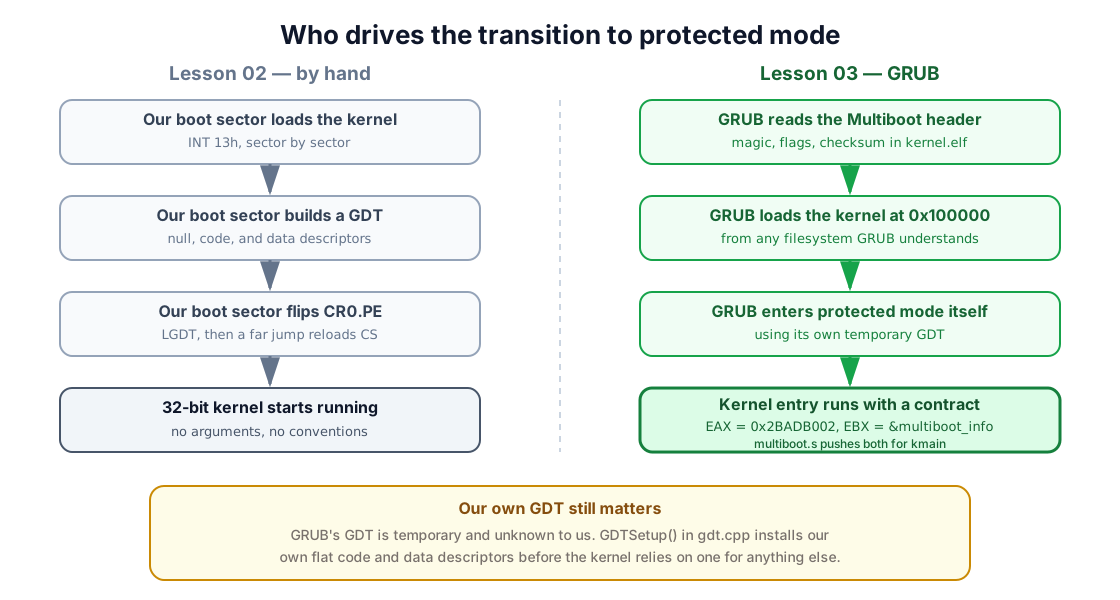
- Replace our hand-rolled boot sector with GRUB, a general-purpose bootloader that already knows how to find a kernel, load it, and switch the CPU into protected mode - as long as our kernel speaks its language, the Multiboot specification.
- Replace hand-written assembly with a small amount of C++, running without an operating system underneath it.
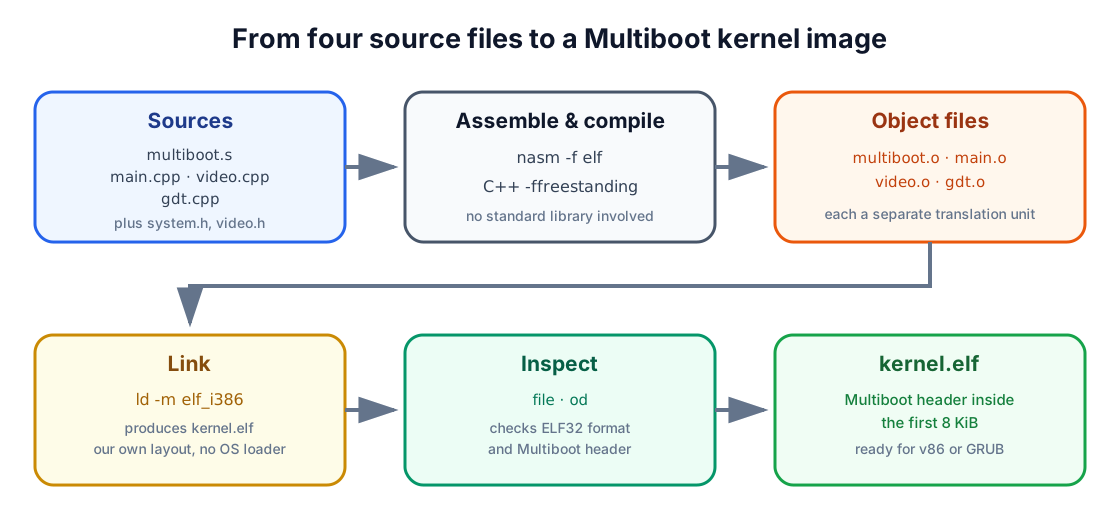
Concretely, you will produce a kernel.elf made of four source files:
| File | Responsibility |
|---|---|
multiboot.s |
Embed the Multiboot header and hand control to kmain |
system.h |
Shared types, port I/O helpers, and small runtime utilities |
video.h / video.cpp |
A Video class that prints text to the screen |
gdt.cpp |
Build our own GDT in C++, replacing GRUB’s temporary one |
main.cpp |
kmain, the C++ entry point that ties everything together |
1. Why hand the boot process to GRUB?
Section titled “1. Why hand the boot process to GRUB?”Every one of our previous boot sectors did the same job by hand: find the kernel on disk, load it sector by sector, and jump to it. That is fine for a 512-byte experiment, but it is also exactly the kind of repetitive, error-prone plumbing that a general tool should do for you instead.
GRUB (the Grand Unified Bootloader) is that tool. It is a real bootloader capable of loading an operating system from several kinds of storage, over several kinds of filesystem, in several executable formats - all of it configured once, in a text file, rather than hand-assembled every time:
| Capability | What it buys us |
|---|---|
| Multiple disk types | Floppy, hard disk, or network boot from the same kernel image |
| Multiple filesystems | FAT, ext2/3, and others - no custom disk-reading code needed |
| Multiple executable formats | ELF, a.out, and more, recognized automatically |
| Compressed images | gzip-compressed kernels, decompressed on the fly |
GRUB does not, however, load just any program into memory and jump to it blindly - it has no way to know where your code expects to run, or whether it is even a kernel at all. So GRUB only agrees to boot something that follows a documented contract: the Multiboot specification. Meet that contract, and GRUB will load your kernel, place it in 32-bit protected mode, and jump straight into it - all the assembly from Lesson 02 handled for you, for free.
2. The Multiboot contract
Section titled “2. The Multiboot contract”To be Multiboot-compliant, a kernel must satisfy two requirements:
- It must be a 32-bit executable.
- It must contain a Multiboot header: a small, fixed-format block, 4-byte aligned, located entirely within the first 8192 bytes of the file.
The header is 32 bytes wide when every optional field is used:
| Offset | Field | Purpose |
|---|---|---|
| 0 | Magic field | The fixed value 0x1BADB002, identifying a Multiboot header |
| 4 | Flags | Which optional features this kernel requests |
| 8 | Checksum | magic + flags + checksum must sum to zero |
| 12 | Header address | Only if flags bit 16 is set: linear address of the header itself |
| 16 | Load address | Only if flags bit 16 is set: where the .text segment begins in memory |
| 20 | Load end address | Only if flags bit 16 is set: end of the data to load from the file |
| 24 | BSS end address | Only if flags bit 16 is set: end of the uninitialized-data region |
| 28 | Entry address | Only if flags bit 16 is set: address of the first instruction to run |
Of the flags bits, three matter here:
- Bit 0 - load modules, if any, on 4 KiB boundaries.
- Bit 1 - populate a memory-information structure for us before boot.
- Bit 16 - the header itself supplies the four address fields above, instead of GRUB reading them from the file’s own ELF headers.
Once GRUB has loaded the kernel and validated its header, it fills in a
second structure, multiboot_info, describing what it found - available
memory, the boot device, and more - and hands a pointer to it directly to
our code:
typedef struct multiboot_memory_map_entry{    unsigned long size;    unsigned long address_low;    unsigned long address_high;    unsigned long length_low;    unsigned long length_high;    unsigned long type;} multiboot_memory_map_entry;
typedef struct multiboot_info{    unsigned long flags;    unsigned long mem_lower;    unsigned long mem_upper;    unsigned long boot_device;    unsigned long cmdline;    unsigned long mods_count;    unsigned long mods_addr;    unsigned long symbols[4];    unsigned long mmap_length;    unsigned long mmap_addr;} multiboot_info_t;
The flags field tells us which of the other fields are actually valid: bit
0 set means mem_lower and mem_upper hold real values (conventional and
extended memory, both in kilobytes); bit 1 set means boot_device identifies
which drive GRUB booted from; and bit 6 set means mmap_addr and
mmap_length describe a sequence of variable-length memory-map entries.
Loaders do not have to provide all three forms. Section 11 checks each flag
before touching the corresponding fields.
3. From source files to a linked image
Section titled “3. From source files to a linked image”Before writing the header, it helps to slow down and name what a linker actually does - Lessons 00 through 02 never needed one, since NASM’s flat binary output is the finished image. C++ changes that: four separate source files must become one program, and something has to do the combining.
Say we compile two tiny C files:
| one.c | two.c |
|---|---|
|
|
A compiler works one file at a time. Compiling one.c alone produces an
object file, one.o - machine code for main, plus an unresolved
reference to func, a symbol this file never defines. Only when a linker
combines one.o and two.o does func() finally resolve to real code, and
does a in two.c resolve to the storage declared in one.c. That
resolving-and-combining step is exactly what turns a pile of separately
compiled pieces into one runnable program.
While combining object files, the linker also groups their contents by purpose into sections, so that similar data ends up next to similar data. Three sections cover almost everything a program needs:
.text- the compiled instructions themselves, such as the code generated formainandfunc..data- initialized global and static variables with a real value, such asbintwo.c..bss- global and static variables with no initial value, such asainone.c. Nothing needs to be stored on disk for these - the loader just needs to reserve zeroed space - so.bsscosts no file space at all.
+--------+| text |+--------+| data |+--------+| bss |+--------+On a normal desktop OS, the linker bundled with your compiler already knows the memory layout that OS expects, and quietly builds it for you. We are not targeting any OS - there is no default layout to borrow - so we have to describe the one our kernel needs ourselves, in a small file called a linker script.
4. The linker script: link.lds
Section titled “4. The linker script: link.lds”A linker script controls exactly which sections end up in the final executable, in what order, and at what addresses. Ours is short enough to read in one pass:
ENTRY(entry)
SECTIONS{    . = 0x00100000;
    .text : ALIGN(4096)    {        code = .;        KEEP(*(.multiboot))        *(.text*)    }
    .rodata : ALIGN(4096)    {        *(.rodata*)    }
    .data : ALIGN(4096)    {        data = .;        *(.data*)    }
    .bss : ALIGN(4096)    {        bss = .;        *(COMMON)        *(.bss*)        *(.stack)    }
    end = .;
    /DISCARD/ :    {        *(.note*)        *(.indent)        *(.comment)        *(.stab)        *(.stabstr)        *(.eh_frame*)    }}
Reading it from the top:
ENTRY(entry)namesentryas the very first instruction to execute - Section 5 defines that label..is the location counter: the linker’s current address while laying out the file. Setting it to0x00100000(1 MiB) means everything that follows is placed starting there - the conventional load address for a Multiboot kernel, safely above the low-memory quirks Lesson 02 spent so much time on.code = .;captures the location counter’s value right now, before any bytes are placed, into a plain symbol namedcode.data,bss, andendmark the other section boundaries in the same way.KEEP(*(.multiboot))puts the Multiboot header first and prevents the linker from discarding it, keeping the header inside the first 8 KiB where a Multiboot loader looks for it.*(.text*)means “pull in every input section whose name starts with.text, from every object file, here.” The same pattern repeats for.rodata*,.*data*,.bss*, andCOMMON(the traditional home for uninitialized global variables before.bssexisted).ALIGN(4096)advances the location counter up to the next 4 KiB boundary- a size we will reuse constantly once paging enters the picture, so it is worth aligning to it now.
*(.stack)reserves room for a section literally named.stack, placed after that same alignment - Section 5 defines it, and it is where our kernel’s stack will actually live./DISCARD/throws away debugging and metadata sections our own kernel has no use for, keeping the final image lean.
5. Embedding the Multiboot header: multiboot.s
Section titled “5. Embedding the Multiboot header: multiboot.s”With the linker script placing .multiboot first, we can write the file that
declares the header and hands the loader’s runtime values to our C++ code:
%define MULTIBOOT_HEADER_MAGIC 0x1BADB002%define MULTIBOOT_HEADER_FLAGS 0x00000003%define MULTIBOOT_CHECKSUM -(MULTIBOOT_HEADER_MAGIC + MULTIBOOT_HEADER_FLAGS)
[BITS 32]
SECTION .multibootALIGN 4multiboot_header:  dd MULTIBOOT_HEADER_MAGIC  dd MULTIBOOT_HEADER_FLAGS  dd MULTIBOOT_CHECKSUM
SECTION .textGLOBAL entryEXTERN kmain
entry:  mov esp, stack
  push ebx  push eax  call kmain
.hang:  cli  hlt  jmp .hang
SECTION .stack nobitsALIGN 16resb 0x10000stack:
A few details are worth slowing down for:
mov esp, stackis the entire stack setup.stackis the label placed afterresb 0x10000inSECTION .stack, so it names the top of that 64 KiB region - exactly where a downward-growing x86 stack should start.push ebxthenpush eaxplacekmain’s two arguments on the stack in reverse order, C calling-convention style: the loader left themultiboot_infopointer inEBXand the magic number0x2BADB002inEAX, and we forward both intokmain.
6. What C++ can (and cannot) do without an operating system
Section titled “6. What C++ can (and cannot) do without an operating system”Compared to C, C++ quietly asks its runtime environment for more help. Most of that help normally comes from the OS or from library startup code you never see. We have neither, so a short honest inventory matters before writing a single class:
| Feature | Status here | Why |
|---|---|---|
new / delete |
Not yet | Need a working heap allocator, which we have not built |
| Exceptions | Not yet | Need unwinding support the runtime would normally provide |
dynamic_cast / typeid (RTTI) |
Not yet | Need runtime type information the compiler would normally emit and support |
| Global and static objects | Not yet | Constructors would need to run before kmain, via linker/runtime setup we have not built |
| Pure virtual functions | Only with care | A stub is needed for what happens if one is ever called without an override |
| Classes, inheritance, local objects | Available now | These need no environment beyond what the compiler itself generates |
This is not a permanent restriction - a later lesson can absolutely build a
heap and wire up global constructors. It is simply not needed yet, and
skipping it keeps this lesson’s kernel small enough to read start to finish.
Everything below only relies on the last row of that table: classes,
inheritance, and objects that live on the stack or as members of other
objects - exactly what Video in Section 9 and GDTEntry in Section 10 need.
7. Low-level helpers: system.h
Section titled “7. Low-level helpers: system.h”system.h is where the handful of things every other file needs to share
lives: fixed-width types, the two instructions that talk to hardware ports,
and declarations for the small utility functions Section 8 implements.
#ifndef SYSTEM_H_#define SYSTEM_H_
#define MULTIBOOT_BOOTLOADER_MAGIC 0x2BADB002
typedef unsigned char BYTE;typedef unsigned short WORD;typedef unsigned int DWORD;typedef unsigned long long QWORD;
typedef struct multiboot_memory_map_entry{    DWORD size;    DWORD address_low;    DWORD address_high;    DWORD length_low;    DWORD length_high;    DWORD type;} multiboot_memory_map_entry;
typedef struct multiboot_info{  DWORD flags;  DWORD mem_lower;  DWORD mem_upper;  DWORD boot_device;  DWORD cmdline;  DWORD mods_count;  DWORD mods_addr;  DWORD symbols[4];  DWORD mmap_length;  DWORD mmap_addr;} multiboot_info;
inline unsigned char inb (unsigned short port){    unsigned char rv;   asm volatile("inb %1, %0" : "=a" (rv) : "dN" (port));    return rv;}
inline void outb (unsigned short port, unsigned char data){    asm volatile("outb %1, %0" : : "dN" (port), "a" (data));}
BYTE *memcpy(BYTE *dest, const BYTE *src, int count);BYTE *memset(BYTE *dest, const BYTE val, int count);void intToString (char *buf, char base, int number);void GDTSetup();
#endif /*SYSTEM_H_*/BYTE, WORD, DWORD, and QWORD simply give the 8/16/32/64-bit unsigned
sizes memorable names - the same widths Lesson 02 wrote as raw hex, now
spelled out.
inb and outb read and write a single byte on a hardware I/O port - the
same doorway Lesson 02’s VGA discussion mentioned but never used. C and C++
have no built-in syntax for “talk to port 0x3D4,” so these two functions
drop into inline assembly to do it directly:
asm volatile("inb %1, %0" : "=a" (rv) : "dN" (port));Reading the three parts after the instruction string:
"=a" (rv)is the output:%0refers to it, and=atells the compiler to fetch the result from registerEAX/ALintorv."dN" (port)is the input:%1refers to it, anddNmeans “putportinDXif it is a runtime value, or encode it directly as an immediate byte if the compiler already knows it at compile time.”volatiletells the compiler not to optimize this instruction away or reorder it - a port read or write is a real side effect on hardware, not a pure calculation it is free to skip or cache.
These two live in the header, marked inline, specifically so that calling
inb(0x3D4) costs nothing beyond the instruction itself: the compiler
substitutes the assembly directly at the call site, the same way a macro
would, with none of the overhead of an actual function call. updateCursor()
in Section 9 is what actually puts them to work.
8. Three small utilities: memcpy, memset, and intToString
Section titled “8. Three small utilities: memcpy, memset, and intToString”Freestanding C++ (the -nostdlib -nostdinc -fno-builtin flags Section 12’s
Makefile passes) means the standard library is simply not there - not even
memcpy. Three tiny implementations cover everything the rest of the kernel
needs.
BYTE* memcpy(BYTE *dest, const BYTE *src, int count){    int i;  for(i=0; i<count; i++)    dest[i] = src[i];  return dest;}
BYTE* memset(BYTE *dest, BYTE val, int count){  int i;  for(i=0; i<count; i++)    dest[i] = val;  return dest;}
Both are exactly as literal as they sound: copy count bytes one at a time,
or stamp the same byte count times. GDTSetup() in Section 10 leans on
memset to zero the required null GDT entry.
intToString is the one with real logic in it - it renders an integer as
decimal (base = 'd'), unsigned decimal ('u'), or hexadecimal ('x'),
into a caller-provided buffer:
void intToString (char *buf, char base, int number){  static char digits[] = "0123456789abcdef";  char *p = buf;  unsigned long uns = number;  int divisor = 10;
  if (base == 'd' && number < 0) {    *p = '-';    p++;  buf++;    uns = -number;  } else if (base == 'x') {    divisor = 16;    *p = '0';    *(p+1) = 'x';    p +=2;    buf +=2;  }  else if(base != 'u')    *buf = 0;
  do {    long remainder = uns % divisor;    *p = digits[remainder];    *p++;  }  while (uns /= divisor);
  *p = 0;
  char *head, *tail;  head  = buf;  tail = p - 1;
  while (head < tail) {    char tmp = *head;    *head = *tail;    *tail = tmp;    head++;    tail--;  }}
Walking through it in the order it actually runs:
-
Sign and prefix. A negative decimal number gets a leading
-, and its magnitude is taken viauns = -number. A hexadecimal number instead gets a leading0x. Either way,pmoves past whatever prefix was just written, so digit-writing always starts from a clean position. -
Extracting digits, one at a time, from the wrong end. Dividing by
divisor(10 or 16) and taking the remainder peels off the least-significant digit first - for12987in decimal, that is7, then8, then9, then2, then1. Each digit is looked up indigits[]and written top, so the string comes out backwards:"78921".!!! note “That
*p++;line looks unusual, and it is - but it works”Operator precedence makes `*p++` mean "dereference `p`, *then*increment `p`" - the dereferenced value here is simply discarded as astatement. It reads like a typo for a plain `p++;`, and functionallythat is exactly what it does; the surrounding line above it is whatactually stores the digit. -
Reversing the string in place. Since the digits came out backwards, a simple two-pointer swap -
headfrom the front,tailfrom the back, walking toward each other - flips"78921"into"12987"before returning.
9. The Video class: printing without BIOS, again
Section titled “9. The Video class: printing without BIOS, again”Lesson 02’s kernel wrote directly to 0xB8000 with a handful of loose
assembly instructions. Video wraps that same idea - and that same memory
address - behind a small class with a cursor, a current color, and a
printf.
#ifndef VIDEO_H_#define VIDEO_H_
#include"system.h"
class Video{private:  // cursor's position  int _x, _y;
  // current attribute  BYTE _attribute;
  // pointer to video memory  BYTE *mem;
  // screen width and height  const int width, height;
public:  Video();
  void clear();  void put(char c);  void printf (const char *format, ...);  void moveTo(int x, int y);  void updateCursor();  void scroll(int dy);  void attribute(BYTE attribute);  BYTE attribute() const;  int x() const;  int y() const;};
#endif /*VIDEO_H_*/
The private members are the entire state a text-mode screen needs: _x, _y
for the cursor, _attribute for the current text color, mem pointing at
video memory, and width/height fixed at the standard 80×25.
Construction
Section titled “Construction”Video::Video() : _x(0), _y(0), _attribute(0x0f), mem(reinterpret_cast<BYTE*>(0xb8000)), width(80), height(25){}The cursor starts at the top-left corner, the attribute defaults to bright
white on black (0x0f), and mem is initialized once, in the constructor’s
initializer list - width and height are declared const, so they can
only ever be set here, never reassigned later.
Writing one character: put()
Section titled “Writing one character: put()”void Video::put(char c){ if(c == 0x08) { if(_x != 0) _x--; } else if(c == '\r') { _x= 0; } else if(c == '\n') { _x= 0; _y++; } else if(c >= ' ') { int index = (_y*width + _x) * 2;
mem[index] = c; mem[index+1] = _attribute;
_x++; }
if(_x >= width) { _x= 0; _y++; }
if(_y >= height) scroll(_y-height+1);
updateCursor();}put handles four cases in order: backspace (0x08, move left without
erasing), carriage return, newline, and finally ordinary printable
characters, written to mem[index]/mem[index+1] at
(_y * width + _x) * 2 - the exact character/attribute pair layout Lesson
02 introduced for VGA text memory. After writing, _x advances by one; if
that pushes it past the last column, the cursor wraps to a new line, and if
that pushes _y past the last row, scroll() makes room. Every call ends
by pushing the new position out to the real hardware cursor.
Moving the hardware cursor: updateCursor()
Section titled “Moving the hardware cursor: updateCursor()”void Video::updateCursor(){ WORD loc = (_y * width) + _x;
outb(0x3D4, 0x0F); outb(0x3D5, loc & 0xFF); outb(0x3D4, 0x0E); outb(0x3D5, (loc>>8) &0xFF);}The blinking cursor you actually see on screen is separate hardware from
the character/attribute bytes put just wrote - it is controlled by the
CRT controller (CRTC), addressed through two I/O ports rather than
memory:
| Port | Role |
|---|---|
0x3D4 |
Index register - selects which CRTC register comes next |
0x3D5 |
Data register - the value for whichever register was just selected |
Since the cursor position is a single 16-bit value split across two 8-bit
registers, setting it takes four outb calls: select register 0x0F,
write the low byte; select register 0x0E, write the high byte. This is
exactly the pair of helper functions from Section 7 finally earning their
keep.
Scrolling and clearing
Section titled “Scrolling and clearing”void Video::scroll(int dy){ if(dy > 0) { memcpy (mem, mem + (dy * width * 2), (height - dy) * width * 2);
int loc = (height-dy)*width*2; for (int i=0; i < dy*width*2; i+=2) { mem[loc+i] = ' '; mem[loc+i+1] = _attribute; } }}
void Video::clear(){ for (int x=0; x<width; ++x) { for (int y=0; y<height; ++y) { put(' '); } }
_x = 0; _y = 0;}scroll moves everything from line dy onward up to the top with one
memcpy, then blanks the newly empty lines it left behind at the bottom.
clear takes the simplest possible route to a blank screen: print a space
into every cell by calling put, then reset the cursor - reusing the exact
same code path a normal character would take, rather than writing memory
directly a second way.
A tiny printf
Section titled “A tiny printf”void Video::printf (const char *format, ...){ const char **arg = reinterpret_cast<const char **> (&format); char c; int num; char buf[20];
arg++;
while((c = *format++) != 0) { if (c == '%') { const char *p; c = *format++; switch (c) { case '%': put('%'); break; case 'd': case 'u': case 'x': num = *(reinterpret_cast<int *> (arg)); arg++; intToString (buf, c, num); for (p = buf; *p != 0; p++) put(*p); break;
case 's': for (p = *arg; *p != 0; p++) put(*p); arg++; break; default: num = *(reinterpret_cast<int *> (arg)); arg++; put (num); break; }
} else { put(c); } }}There is no <cstdarg> here - no operating system C library to provide
one - so printf reaches its variadic arguments the way va_list would
have to under the hood anyway: by taking the address of its last named
parameter, format, and treating everything after it on the stack as an
array of pointers. arg++ steps over format itself to reach the first
real argument, and each case advances arg again after consuming one.
The format specifiers it understands are deliberately minimal:
| Specifier | Meaning |
|---|---|
%d |
Signed decimal integer |
%u |
Unsigned decimal integer |
%x |
Hexadecimal integer |
%s |
Null-terminated string |
%% |
A literal % |
%d/%u/%x all funnel through the same intToString from Section 8,
just with a different base character; %s walks the given string one
character at a time. Everything else - any character that is not a % -
goes straight to put unchanged. Section 11’s kmain is what finally puts
this to use, printing GRUB’s memory and boot-device information.
10. A protected-mode GDT, now in C++
Section titled “10. A protected-mode GDT, now in C++”GRUB already switched the CPU into protected mode before jumping to our
kernel, using a GDT of its own - but that GDT is temporary and not something
we control or even know the exact shape of. gdt.cpp builds a proper one,
using the exact same 8-byte descriptor Lesson 02 wrote as raw binary,
expressed here as a named C++ bitfield struct instead.
#include "system.h"
struct GDTEntry{    WORD limit_1;      // segment limit bits 0->15    WORD base_1;    // segment base address bits 0->15  BYTE base_2;      // segment base address bits 16->23
  BYTE type:4;      // segment type  BYTE system:1;    // descriptor type  BYTE dpl:2;        // descriptor privilige level  BYTE present:1;    // segment present in memory
    BYTE limit_2:4;      // segment limit bits 16->19  BYTE avl:1;        // available bit  BYTE zero:1;      // zero field for 32 bit architecture  BYTE db:1;        // D/B field  BYTE granularity:1;  // Granularity field
    BYTE base_3;      // segment base address bits 24->31} __attribute__((packed));
struct GDTR {    WORD limit;    DWORD base;} __attribute__((packed));
#define MAX_ENTRIES 3GDTEntry gdt[MAX_ENTRIES];GDTR gptr;
__attribute__((packed)) on both structs tells GCC not to insert its usual
padding between fields - without it, the compiler would be free to round
GDTEntry up to a “nicer” size, and the CPU expects these exact 8 bytes
back to back, with no gaps, no exceptions.
Filling in one descriptor
Section titled “Filling in one descriptor”void setGDTEntry(int num, bool isCode, int dpl){ if(num>= MAX_ENTRIES) return; gdt[num].base_1 = 0; gdt[num].base_2 = 0; gdt[num].base_3 = 0;
gdt[num].limit_1 = 0xFFFF; gdt[num].limit_2 = 0xF;
gdt[num].type = (isCode)?0xb:0x3; gdt[num].system = 1; gdt[num].dpl = (dpl & 3); gdt[num].present = 1;
gdt[num].avl = 0; gdt[num].db = 1; gdt[num].zero = 0; gdt[num].granularity = 1;}Every field here matches a value Lesson 02 wrote out as raw hex: base 0
and limit 0xFFFFF (split across limit_1/limit_2, scaled to 4 GiB by
granularity = 1), present = 1, db = 1 for 32-bit segments, and dpl
masked to its low two bits so a caller can never accidentally request a
privilege level outside 0-3. The one real choice this function makes is
type: 0xb for an executable code segment, 0x3 for a writable data
segment - the same distinction as Lesson 02’s access bytes 0x9A versus
0x92, just split into named fields instead of packed binary literals.
Loading the table
Section titled “Loading the table”void GDTSetup(){ gptr.limit = (sizeof(GDTEntry) * MAX_ENTRIES)-1 ; gptr.base = (DWORD)&gdt;
BYTE *entry = reinterpret_cast<BYTE*>(gdt); memset(entry, 0, sizeof(GDTEntry));
setGDTEntry(1, true, 0); setGDTEntry(2, false, 0);
asm volatile ("lgdt %0 \n\ ljmp $8,$1f \n\ 1: \n\ movw $16, %%ax \n\ movw %%ax, %%ss \n\ movw %%ax, %%ds \n\ movw %%ax, %%es \n\ movw %%ax, %%fs \n\ movw %%ax, %%gs" :: "m"(gptr));}The shape should feel familiar from Lesson 02’s protected-mode transition, even though the syntax has changed completely:
gptris filled in exactly like Lesson 02’sgdtPointer- a 16-bit limit and a 32-bit linear base, ready forLGDT.- Entry 0 is explicitly zeroed with
memset- the required null descriptor, built here in code instead of adq 0in assembly. setGDTEntry(1, true, 0)andsetGDTEntry(2, false, 0)build the flat code and data descriptors, both at privilege level 0.- The inline assembly block is this lesson’s entire “mode switch”:
lgdtloads the new table,ljmp $8,$1fis a far jump to a local label (1:, immediately below) through selector0x08- reloadingCSfrom our new code descriptor, exactly the way Lesson 02’s far jump did. The fivemovwinstructions afterward load selector0x10into every remaining segment register, replacing whatever GRUB’s temporary GDT had left there.
GRUB got us into protected mode; this function is what makes protected mode ours.
11. main.cpp: kmain, the real entry point
Section titled “11. main.cpp: kmain, the real entry point”Everything so far exists to make this function possible: a Multiboot loader
validated our header and jumped into multiboot.s, which forwarded its two
register values and called kmain. main.cpp also happens to be where
memcpy, memset, and intToString are actually defined - the same three
functions Section 8 already walked through in full, so only kmain itself is
repeated here:
static DWORD usableMemoryKilobytes(const multiboot_info *information){    DWORD total = 0;    DWORD cursor = information->mmap_addr;    DWORD end = cursor + information->mmap_length;
    while (cursor < end)    {        const multiboot_memory_map_entry *entry =            reinterpret_cast<const multiboot_memory_map_entry *>(cursor);
        if (entry->size < 20)            break;
        if (entry->type == 1 && entry->length_high == 0)            total += entry->length_low / 1024;
        cursor += entry->size + sizeof(entry->size);    }
    return total;}
extern "C" void kmain(DWORD magic, multiboot_info *information){    GDTSetup();
    Video video;    const char *devices[] = { "floppy A", "hard disk" };    video.clear();
    if (magic != MULTIBOOT_BOOTLOADER_MAGIC)    {        video.printf("Assalamou Alaikoum without Multiboot\n");        video.printf("Invalid magic number %x\n", magic);    }    else    {        video.printf("Assalamou Alaikoum from Multiboot\n");
        if (information->flags & 1)        {            video.printf("Lower memory = %uKB\n", information->mem_lower);            video.printf("Upper memory = %uKB\n", information->mem_upper);        }        else if (information->flags & (1 << 6))        {            video.printf(                "Usable memory = %uKB (memory map)\n",                usableMemoryKilobytes(information));        }        else        {            video.printf("Memory information = not provided\n");        }
        if (information->flags & 2)        {            char bootDevice = (information->boot_device >> 24) & 0xF;            const char *device = bootDevice ? devices[1] : devices[0];            video.printf("Boot device = %s\n", device);        }        else        {            video.printf("Boot device = not provided\n");        }    }
    while (1)        asm volatile("cli; hlt");}
In order:
extern "C"disables C++ name mangling forkmain- without it, the compiler would encode the parameter types into the symbol name, andmultiboot.s’scall kmainwould find nothing to link against.GDTSetup()runs first, installing our own descriptors before anything else depends on protected mode behaving predictably.Video video;constructs directly on the stack - a local object, exactly the case Section 6 flagged as safe without a heap or global-constructor support.- The magic-number check confirms a Multiboot-compatible loader actually
brought us here; either way, a greeting prints using the
Video::printfSection 9 just built. - The runtime flags gate every optional field. The kernel accepts either the compact lower/upper-memory pair from bit 0 or the richer memory map from bit 6. Type 1 map entries identify usable RAM.
boot_device’s top byte identifies the BIOS drive; a two-entry lookup table turns it into a human-readable name. When a direct loader did not boot from a disk, the kernel reports that the field was not provided.- The final
cli; hltloop halts once there is nothing left to report - there is still no interrupt table to safely return control to.
12. Building and running the kernel
Section titled “12. Building and running the kernel”The repository Makefile assembles the entry stub as ELF32, compiles the C++
without a hosted runtime, and links everything at 0x00100000:
make -C "lesson 03" kernelmake -C "lesson 03" inspectThe inspection step verifies both the executable format and the header:
format: ... ELF 32-bit ... Intel 80386 ...multiboot header: 1badb002Run it in your browser
Section titled “Run it in your browser”For this playground, v86 implements the Multiboot loader contract directly.
It loads the same kernel.elf, places the runtime magic in EAX, places the
information pointer in EBX, and starts at entry. There is no GRUB menu or
CD-ROM image in this path.
v86 supplies a Multiboot memory map (runtime flag 6) for this direct-loading path, rather than the older lower/upper-memory fields. It also supplies no boot-device field because no disk was involved. The browser output therefore looks like this:
Assalamou Alaikoum from MultibootUsable memory = ...KB (memory map)Boot device = not providedkernel.elf is also a normal Multiboot-compliant kernel that GRUB can load.
To follow the original GRUB route, prepare a floppy image containing GRUB,
copy the kernel onto it, and add a small configuration file:
default 0
#Entry 0:title Arabian OSroot (fd0)kernel /kernel.elf
root (fd0) tells GRUB which drive to read from, and kernel /kernel.elf
names the file to load and boot. Copy kernel.elf to the image’s root
directory, save menu.cfg in its boot directory, and the floppy is ready.
Boot it in an emulator such as Bochs or QEMU, and GRUB’s own menu appears first - pick the single entry, and the machine hands control to our kernel:
Assalamou Alaikoum from MultibootLower memory = 639KBUpper memory = 31744KBBoot device = floppy AThe exact memory figures will vary by machine - what matters is that every
line came from mbi, the structure the loader built and handed to kmain,
printed through a printf we wrote ourselves, on a screen managed by a
Video object instead of loose assembly.
13. Troubleshooting
Section titled “13. Troubleshooting”| Symptom | Likely cause |
|---|---|
undefined reference to 'kmain' |
The assembly declaration and the C++ extern "C" symbol do not agree |
| GRUB refuses to boot the kernel, or reports an invalid Multiboot image | The header is not 4-byte aligned, sits past byte 8192, or the checksum is wrong |
Invalid magic number prints on screen |
Something other than a Multiboot-compliant loader started the kernel |
| Linking produces a Mach-O or 64-bit file | Use an ELF32-capable linker and the Makefile’s freestanding i386 target |
| The screen prints garbage instead of text | Check _attribute, the (_y*width + _x) * 2 indexing, and that mem still points at 0xB8000 |
| The machine resets instead of printing anything | Check GDTSetup() runs before anything else, and that esp was set to stack in multiboot.s |
14. What you have learned
Section titled “14. What you have learned”The shape of this lesson mirrors the shift it makes: less hand-written plumbing, more of the actual kernel. You now have a kernel that:
- Declares a Multiboot header GRUB recognizes and validates.
- Uses a linker script to lay out
.text,.rodata,.data, and.bssat a chosen load address, without any help from an OS toolchain default. - Reads the
multiboot_infostructure its loader fills in, including available memory and an optional boot device. - Prints to the screen through a small
Videoclass with its own cursor, scrolling, andprintf. - Replaces GRUB’s temporary GDT with one built and loaded from C++.
- Knows precisely which C++ features are safe to use without an operating system underneath - and which ones are not, yet.
The next lesson finally builds an IDT and starts handling interrupts - CPU exceptions first, hardware devices soon after. Every low-level habit from this lesson and the two before it - careful register discipline, exact memory layouts, checking your assumptions against the CPU’s actual rules - carries forward unchanged.